
Ekran görüntüleri

Uygulama ayrıntıları
- Sürüm
- 1
- Boyut
- 6.01 MB
- Güncellendi
- June 24, 2024
- Gerektirir
- Windows 11
- Lisans
- Free
- Geliştirici
- Barcode Generator
- Kategori
- Windows OS
SoftPas dilinde:
Bu ürün aşağıdaki dillerde de mevcuttur:
Windows Corporate Barcode Maker Tool hakkında
Windows Corporate Barcode Maker Tool'ı İndirin – Ücretsiz, Güvenli, Toplu Barkod Üreticisi Windows ve Mac için
The Windows Corporate Barcode Maker Tool is a professional-grade software solution designed for businesses seeking efficient, scalable, and secure barcode generation for inventory, logistics, retail, and supply chain management. Whether you're managing thousands of SKUs or organizing shipping labels, this tool streamlines the entire barcode creation process. With support for over 20 barcode standards—including Codabar, Code 128, QR Code, DataMatrix, and EAN-13—this software ensures compatibility across global industry standards. Its standout batch processing feature allows users to import data from Excel, CSV, and text files to generate hundreds or even thousands of unique barcodes in minutes. The intuitive interface makes it accessible for beginners while offering advanced customization options for experienced users. You can easily copy and paste barcodes into Microsoft Word, Excel, PowerPoint, and other Windows applications. Additionally, exported labels can be saved in high-quality image formats like JPEG, PNG, and PDF—perfect for printing or digital sharing. With built-in security protocols and regular updates, this tool is ideal for corporate environments where data integrity and consistency are critical.
Windows Corporate Barcode Maker Tool'ın Temel Özellikleri
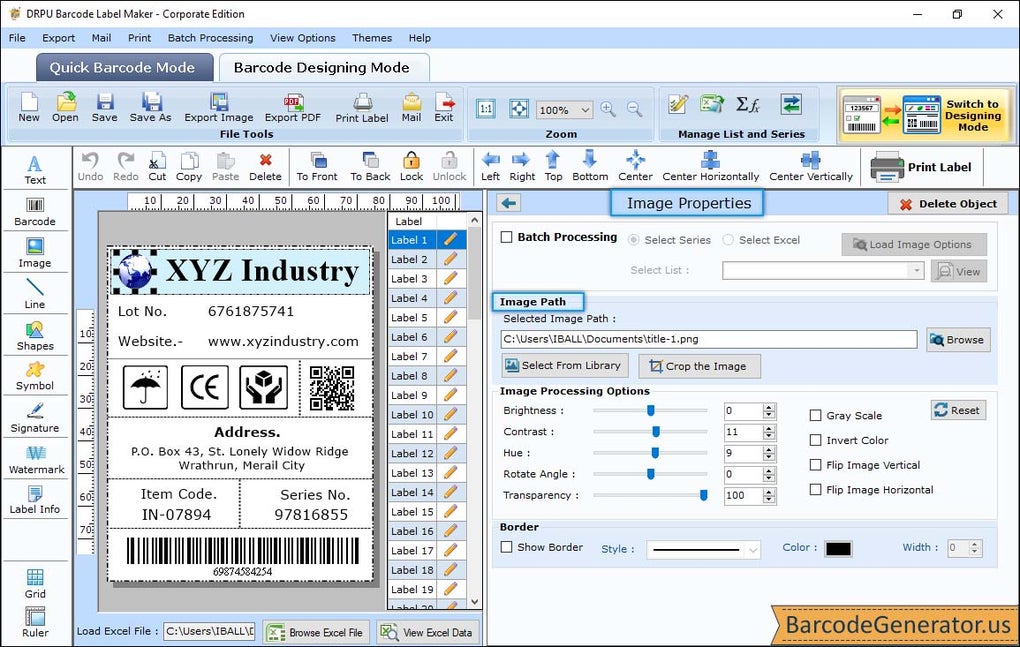
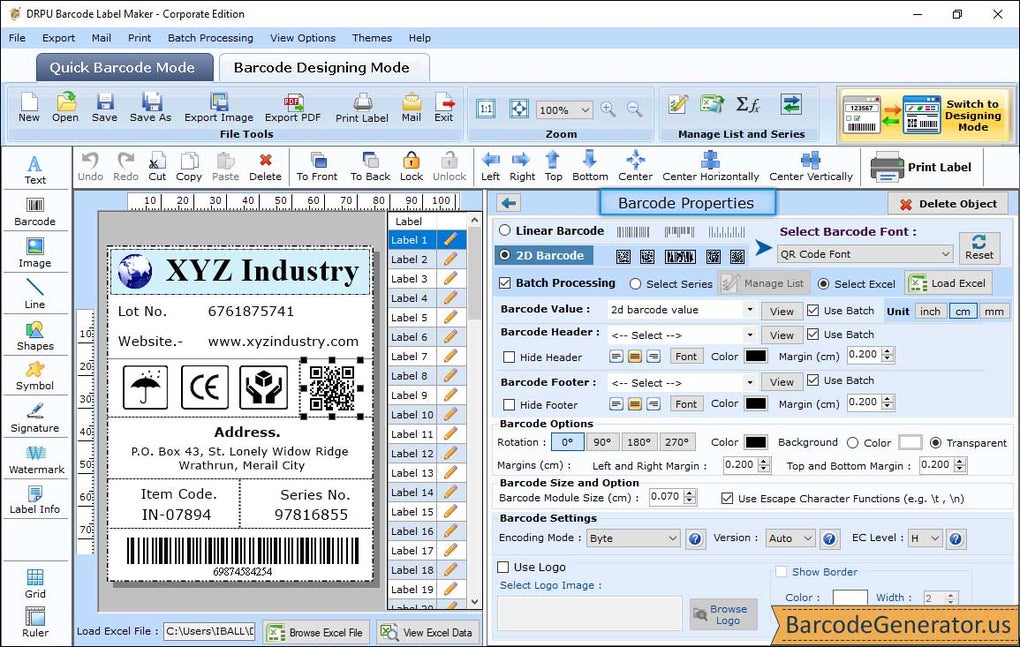
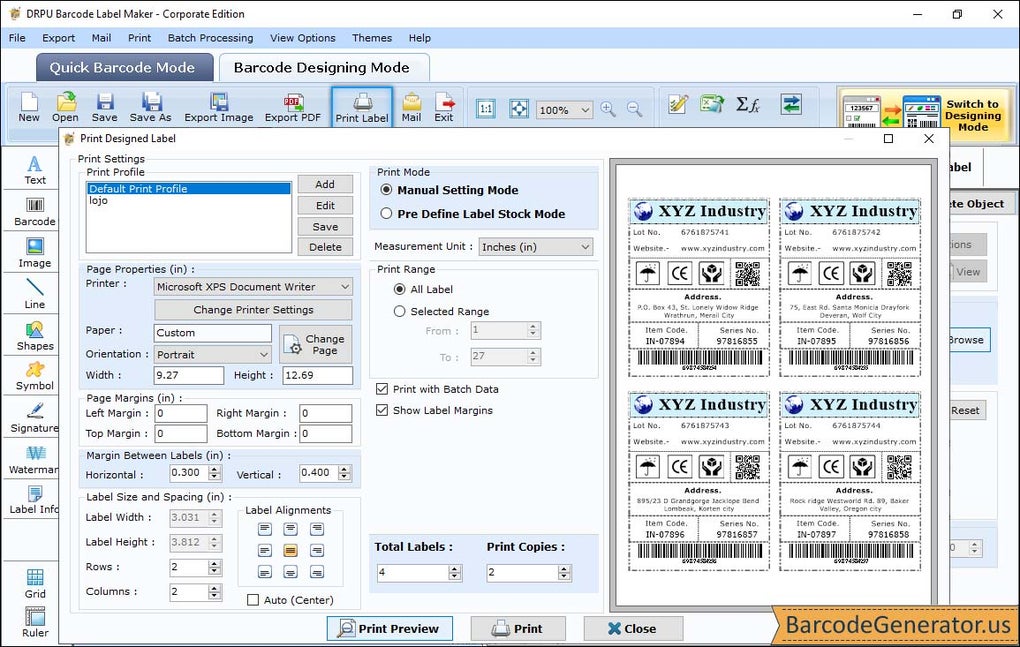
The Windows Corporate Barcode Maker Tool comes packed with features tailored for enterprise-level barcode management. One of its most powerful capabilities is batch processing, which enables users to generate large volumes of barcodes with unique values in a single operation. By importing data from Excel spreadsheets or plain text files, businesses can automate label creation for inventory tracking, product serialization, or shipping manifests. The software supports a wide range of barcode types, including linear (Code 128, UPC-A, EAN-13) and 2D formats (QR Code, DataMatrix, PDF417), ensuring compatibility with scanners and systems worldwide. Users can customize font size, color, orientation, and label layout to match brand guidelines or printing requirements. The tool also includes a preview mode that lets you see how labels will appear before printing, reducing errors and waste. Another valuable feature is the ability to copy and paste barcodes directly into Microsoft Office applications, making it easy to integrate labels into reports, invoices, or packaging designs. For digital distribution, barcodes can be exported in multiple formats—JPEG, PNG, and PDF—ensuring high-resolution output suitable for both print and screen. The software also includes data validation tools to prevent input errors, and a print queue manager to handle multiple print jobs efficiently. Whether you're a small business or a large corporation, this tool scales seamlessly to meet growing demands.
Windows Corporate Barcode Maker Tool'ı Nasıl Kurup Kullanabilirsiniz
Installing the Windows Corporate Barcode Maker Tool is quick and straightforward. Begin by downloading the latest version from the official website. The installer is lightweight and compatible with Windows 10, 11, and Windows Server environments. Once downloaded, run the executable file and follow the on-screen prompts to complete the setup. The installation process takes less than two minutes and does not require administrator rights for basic use. After installation, launch the application to access the clean, intuitive dashboard. To create your first batch of barcodes, click on “New Project” and choose between manual entry or importing data from an Excel (.xlsx) or CSV file. If you're using an Excel file, ensure your data is properly formatted with columns for item names, IDs, and barcode values. The tool will automatically detect the structure and map fields accordingly. Next, select your preferred barcode type—such as Code 128 or QR Code—from the dropdown menu. Customize label size, margins, font, and colors using the built-in editor. Once configured, click “Generate” to produce all barcodes. You can then preview them, adjust spacing, or reposition elements before finalizing. To export, choose your desired format—JPEG, PNG, or PDF—and specify the output folder. The software also supports direct printing via connected label printers or standard printers. For ongoing use, the tool includes an auto-update checker that notifies you of new versions, ensuring you always have the latest security patches and feature improvements.
Uyumluluk ve Sistem Gereksinimleri
The Windows Corporate Barcode Maker Tool is designed for maximum compatibility across modern business environments. It runs smoothly on Windows 10, Windows 11, and Windows Server 2016/2019/2022, making it ideal for enterprise IT departments. While primarily built for Windows, the software is also available as a compatible version for Mac OS X (10.14 and later), allowing teams with mixed operating systems to collaborate seamlessly. The application supports integration with popular business tools such as Microsoft Excel, Word, and Outlook, enabling users to embed barcodes directly into documents, emails, and presentations. It also works with most standard label printers—including Zebra, Brother, and Epson—via USB, network, or Bluetooth connections. The software requires a minimum of 2 GB RAM, 500 MB of free disk space, and a screen resolution of 1024x768 or higher. No special hardware is required, making it accessible even on older workstations. For cloud-based workflows, the tool allows exporting barcode labels to shared drives or cloud storage platforms like OneDrive and Google Drive. The interface is fully responsive and supports high DPI displays, ensuring sharp visuals on 4K monitors. Regular updates are released to maintain compatibility with new Windows versions and security standards. Whether used on a desktop, laptop, or thin client, this software delivers consistent performance and reliability across all supported platforms.
Windows Corporate Barcode Maker Tool'ın Artıları ve Eksileri
- Pros:
- Toplu barkod üretimi için güçlü toplu işleme
- QR Code ve DataMatrix dahil 20'den fazla barkod standardını destekler
- Excel, Word ve diğer Microsoft Office uygulamalarıyla sorunsuz entegrasyon
- JPEG, PNG ve PDF formatlarında yüksek kaliteli dışa aktarımlar
- Yeni başlayanlar ve uzmanlar için uygun sezgisel arayüz
- Düzenli ücretsiz güncellemeler ve güçlü güvenlik protokolleri
- Windows, Mac ve büyük etiket yazıcılarıyla uyumlu
- Cons:
- Gelişmiş özellikler ücretli lisans gerektirir (ücretsiz sürümde çıktı sınırlıdır)
- Android veya iOS için yerel mobil uygulama yok (etiketler cihazlarda görüntülenebilir)
- Barkod standartlarına aşina olmayan kullanıcılar için öğrenme eğrisi
- Karmaşık etiket düzenleri için yazıcı sürücü yapılandırması gerekebilir
- Bulut senkronizasyonu yerleşik değil (üçüncü taraf araçlar gerekir)
Sıkça Sorulan Sorular (SSS)
-
Excel dosyasından barkod üretebilir miyim?
Evet, Windows Corporate Barcode Maker Tool Excel (.xlsx) ve CSV dosyalarından veri almayı tam olarak destekler. Sütunlarınızı barkod alanlarına (örneğin ürün kimliği, SKU, seri numarası) eşlemeniz yeterlidir; araç her satır için otomatik olarak benzersiz barkodlar oluşturur.
-
Yazılımı ücretsiz olarak indirip kullanabilir miyim?
Evet, temel özelliklere sahip ücretsiz bir sürümü indirebilir ve kullanabilirsiniz. Ancak toplu işleme, gelişmiş dışa aktarma formatları ve sınırsız çıktı gibi tam işlevsellik ücretli lisans gerektirir. Ücretsiz sürüm, test ve küçük ölçekli projeler için idealdir.
-
Mac bilgisayarlarda çalışıyor mu?
Evet, yazılım Mac OS X 10.14 ve üzeri için mevcuttur. Windows sürümüyle aynı temel özellikleri sunar; bu da farklı işletim sistemleri kullanan ekipler için platformlar arası tutarlılık sağlar.
-
Araçtan doğrudan barkod yazdırabilir miyim?
Kesinlikle. Araç, standart ve etiket yazıcılarına doğrudan baskıyı destekler. Yazıcıya gönderilmeden önce baskı kenar boşluklarını, ölçeğini ve düzenini ayarlayabilirsiniz; bu da depo ve gönderim departmanları için idealdir.
-
Yazılım ne sıklıkla güncelleniyor?
Geliştiriciler, hata düzeltmeleri, güvenlik yamaları ve yeni barkod standardı desteği içeren düzenli güncellemeleri her 6–8 haftada bir yayınlar. Güncellemeler mevcut olduğunda kullanıcılar otomatik olarak bilgilendirilir.
Sonuç: Neden Windows Corporate Barcode Maker Tool'ı Seçmelisiniz?
If you're looking for a secure, scalable, and user-friendly barcode generator for your business, the Windows Corporate Barcode Maker Tool stands out as a top choice. Whether you're managing inventory, shipping goods, or creating product labels, this software delivers speed, accuracy, and flexibility. Its batch processing capability saves hours of manual work, while the support for multiple barcode standards ensures compatibility across industries. The ability to copy and paste barcodes into Word or Excel, combined with high-quality export options, makes it a versatile tool for both digital and print workflows. With support for Windows, Mac, and major printers, it fits seamlessly into modern corporate environments. While the free version offers a solid foundation, upgrading unlocks full potential for enterprise use. For businesses serious about efficiency and accuracy, this tool is a must-have. Windows Corporate Barcode Maker Tool'ı bugün indirin ve etiketleme sürecinizi güvenle hızlandırın.
CTA: Ücretsiz Şimdi İndir – Windows Corporate Barcode Maker Tool'ı Bugün Deneyin
Kılavuzlar ve eğitimler
Windows Corporate Barcode Maker Tool nasıl yüklenir
- Yukarıdaki İndir düğmesine tıklayın.
- Yönlendirildikten sonra şartları kabul edin ve Yükle’ye tıklayın.
- Windows Corporate Barcode Maker Tool indirmesinin cihazınızda tamamlanmasını bekleyin.
Windows Corporate Barcode Maker Tool nasıl kullanılır
Bu yazılım temel olarak yukarıda açıklanan ana özellikleri için kullanılır. Yüklemeden sonra uygulamayı açarak yeteneklerini keşfedin.
Kullanıcı yorumları
Henüz inceleme yok. Deneyiminizi ilk paylaşan siz olun.
Bunları da beğenebilirsiniz
daha fazla
Llama 2
Free-to-use large language model As the new addition to Meta’s arsenal of langua...

NotebookLM
Revolutionizing the note-taking and idea-generation process NotebookLM is an exp...

Github co pilot
AI-inspired software development and coding platform GitHub Copilot is a browser...

Google Gemma
Google’s lightweight AI models Introducing Google Gemma , a family of cutting-ed...

AI Image Enlarger
A free app for Windows, by ai-image-larger. AI Image Enlarger is a free software...

DALL E
AI-driven text-to-image transformation engine DALL·E is a free graphic and desig...